Agones, OpenMatch, and K8s
This article is Day 22 of Unreal Engine (UE) Advent Calendar 2025 Series 1. Hi, I’m Mizuame. Currently 2025/12/21 17:25, 6 hours until publish! Yikes! Finished writing at 19:14~
Introduction
Readers are probably from the UE community, so suddenly talking about K8s and Agones might be confusing. I’ll explain carefully. Please read to the end.
Actual gameplay: https://x.com/mizuameisgod/status/1990358140152676466
What is Docker?
Quoting from University of Tsukuba Programming Language Processing class: https://kdb.tsukuba.ac.jp/syllabi/2025/GB30504/jpn
Virtualization technology abstracts physical hardware resources (CPU, memory, storage) as virtual machines, enabling multiple environments. Virtual machines run on host physical machines, providing logical environments for independent operating systems and applications.
Docker is container-type.
Technology that packages applications and dependencies, running independently on host OS. Containers share host OS kernel, lighter and faster than VMs.
Container-type shares host OS kernel, only host OS directly accesses hardware. Process-level isolation ensures each container’s application and dependencies are independent.
We use it to safely run UE Linux binaries, absorbing environment differences for stable execution.
What is K8s?
Kubernetes. Open-source system orchestrating containers like Docker. Loosely, it schedules containers, load balances, etc. The foundation of cloud services you use daily. Cloud is someone’s on-premises.
What is Agones?
Directly manages UE Dedicated Server. Handles server lifecycle. OSS mainly by Google.
What is OpenMatch?
Handles matchmaking as the name suggests. Bridges clients and Agones. (OpenMatch passes match results to AgonesAllocator to allocate servers) OSS mainly by Google.
Overview
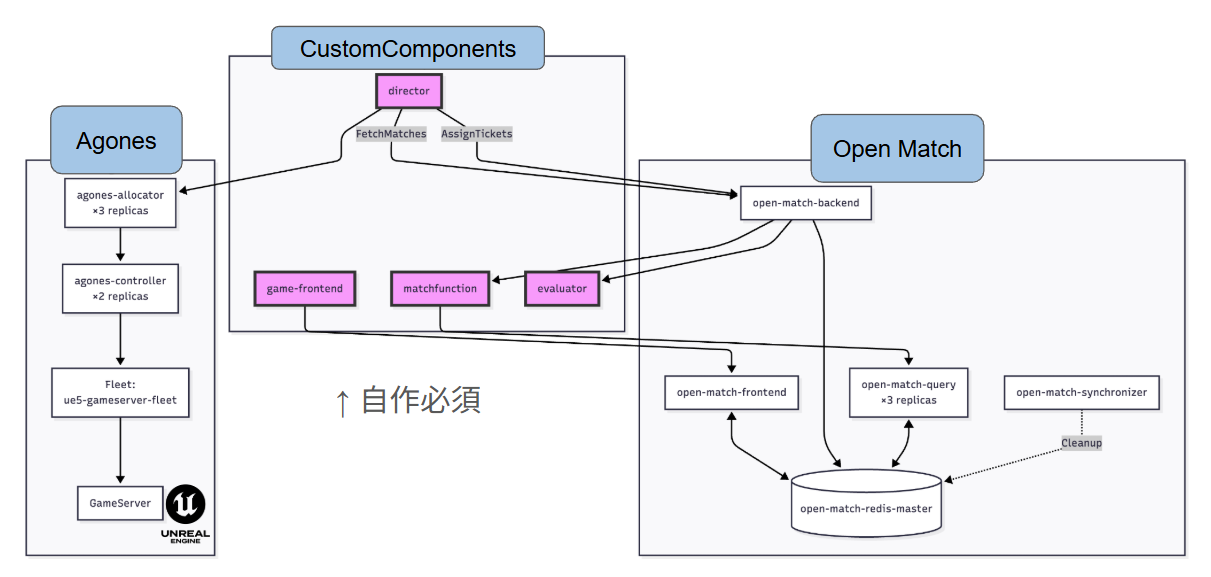
Unfortunately OpenMatch doesn’t provide everything; you need to write CustomComponents like director, evaluator, match function, game frontend yourself (Python or Go).
-
Game Frontend HTTP API server for game clients Receives matchmaking requests from players Creates tickets to Open Match Frontend Service Waits for assignment (server allocation) and returns result Issues JWT authentication tokens for game server connection
-
Match Function Custom logic to create match proposals Gets waiting tickets from Query Service Executes matching algorithm Returns match proposals to Backend
-
Evaluator Evaluates and selects proposals from Match Function
-
Director Matchmaking orchestrator Gets match results from Backend Allocates GameServer via Agones/Kubernetes Assigns server connection info to matched players
I implemented all of them simply since no working samples existed: https://github.com/mizuamedesu/easy-open-match
What Does This Mean?
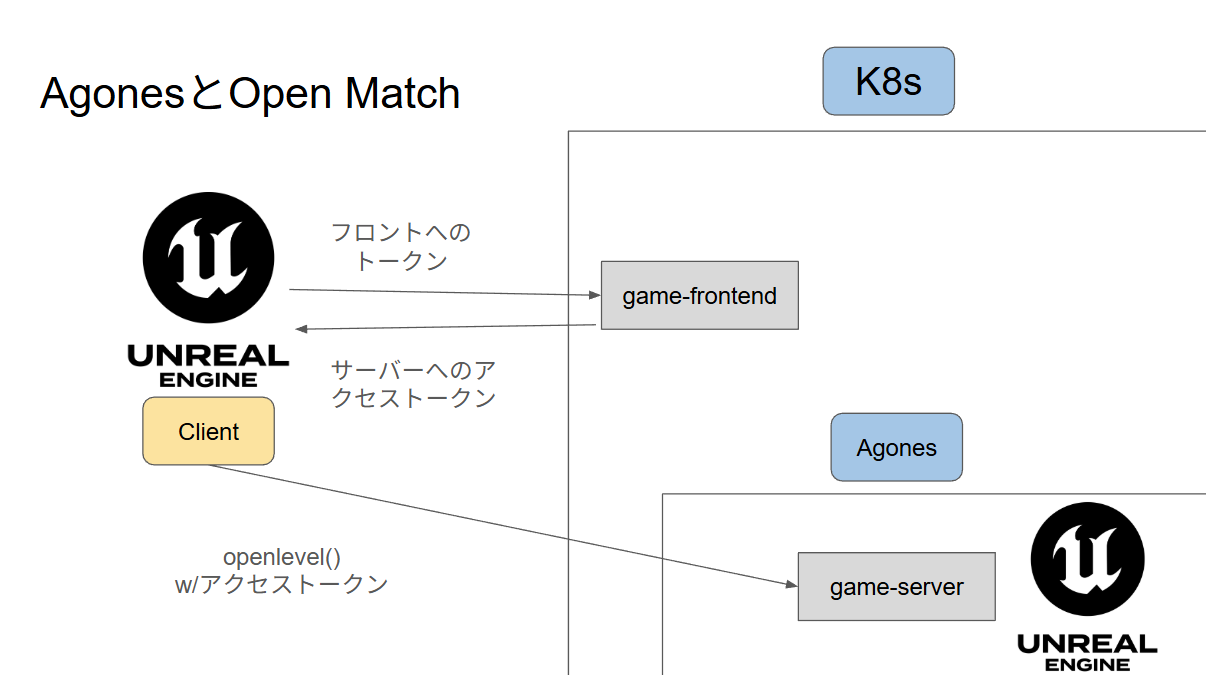
Abstracting server-side, from client perspective:
- Send HTTP matchmaking request to game frontend
- On match completion, server returns dedicated server IP+Port and JWT
- Client opens with OpenLevel
- Dedicated server requests token exchange via RPC on client connection
- Server verifies JWT against game frontend’s well-known JSON, sets flag on success, kicks client on failure/timeout
Kick Implementation
static void KickPlayerInternal(APlayerController* PlayerController, const FText& Reason)
{
    if (!PlayerController) return;

    UWorld* World = PlayerController->GetWorld();
    if (!World) return;

    AGameModeBase* GameMode = World->GetAuthGameMode();
    if (!GameMode) return;

    AGameSession* GameSession = GameMode->GameSession;
    if (!GameSession) return;

    GameSession->KickPlayer(PlayerController, Reason);
}
Kick function isn’t exposed to Blueprint for some reason, need custom implementation.
Just call AGameSession::KickPlayer().
Also, PlayerController needs implementation to receive kick events:
void ABattlePlayerController::ClientWasKicked_Implementation(const FText& KickReason)
{
    Super::ClientWasKicked_Implementation(KickReason);

    // Save kick reason
    LastKickReason = KickReason;
    bWasKicked = true;

    // Log output
    UE_LOG(LogBattlePlayerController, Warning, TEXT("Client was kicked from server. Reason: %s"), *KickReason.ToString());

    // Display debug message on screen
    if (GEngine)
    {
        GEngine->AddOnScreenDebugMessage(-1, 10.0f, FColor::Red,
            FString::Printf(TEXT("Kicked: %s"), *KickReason.ToString()));
    }

    // Call Blueprint event
    OnKickedFromServer(KickReason);
    ReceiveKickedFromServer(KickReason);
}
Created a BP class inheriting this.
GameMode Implementation
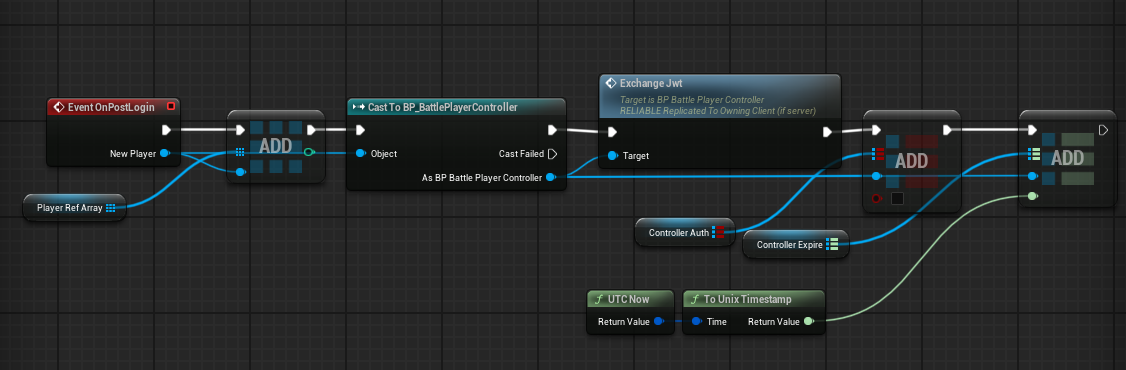
First override Event OnPostLogin, cast PlayerController to our custom class, and send RPC. Flow is Server→Client.
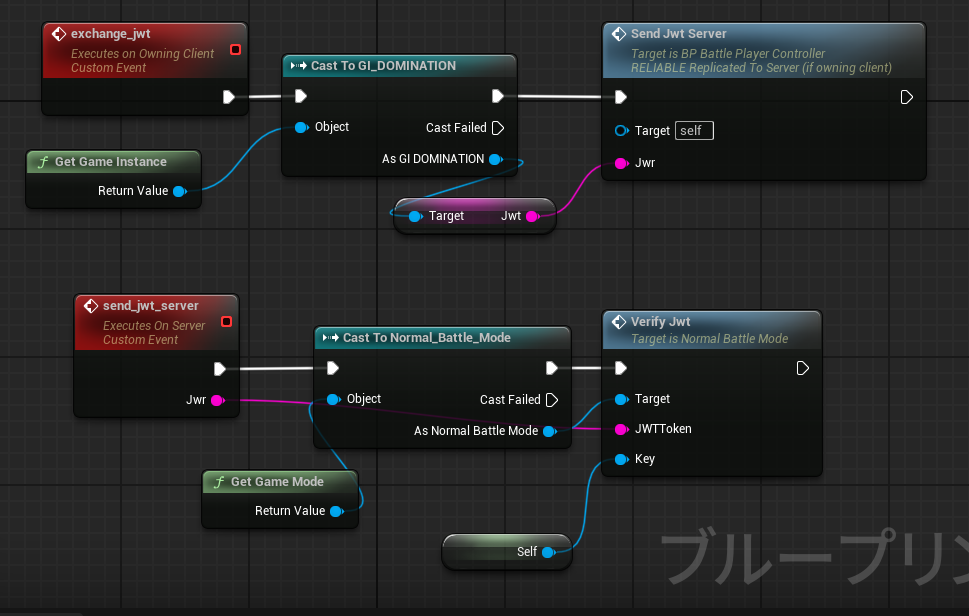
Client receiving RPC calls RPC to send JWT to server.
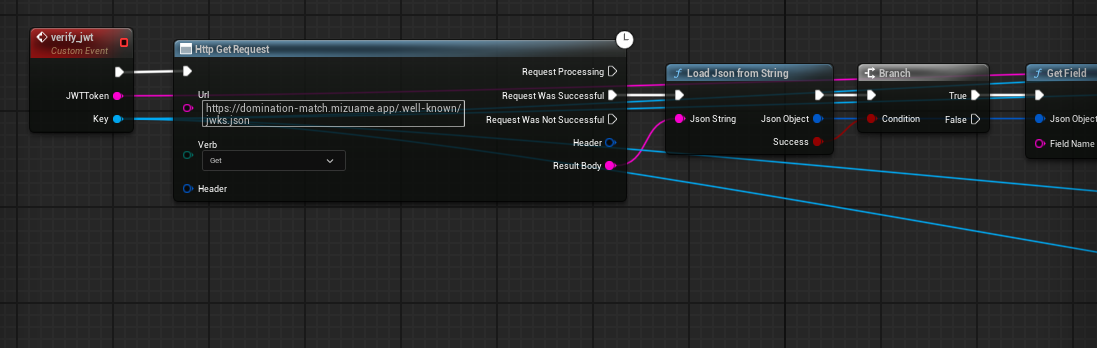
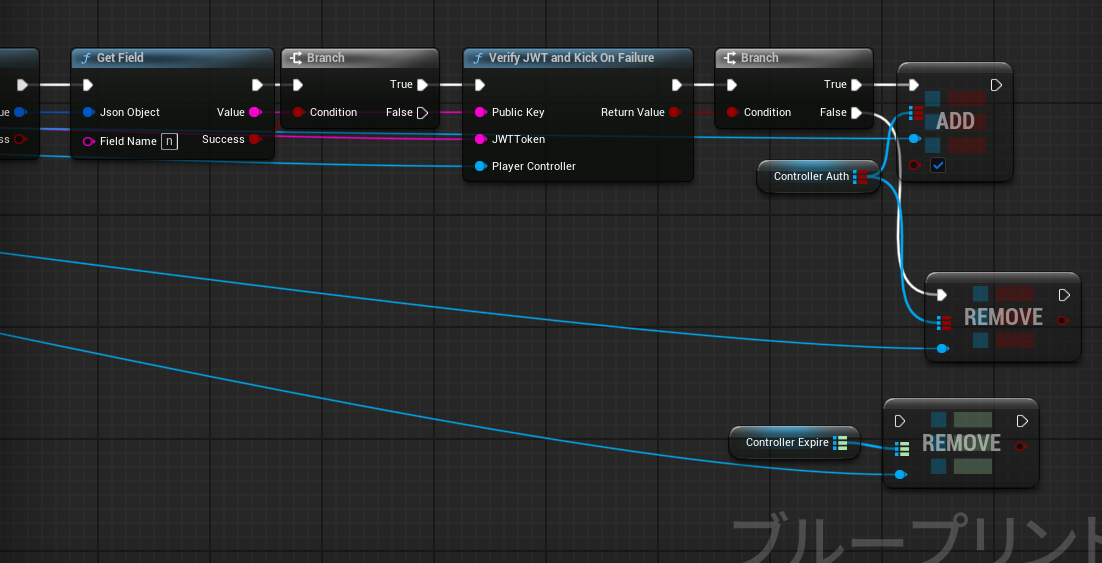
Server receiving RPC fetches well-known JSON public key, sets completion flag on successful verification, kicks on failure.
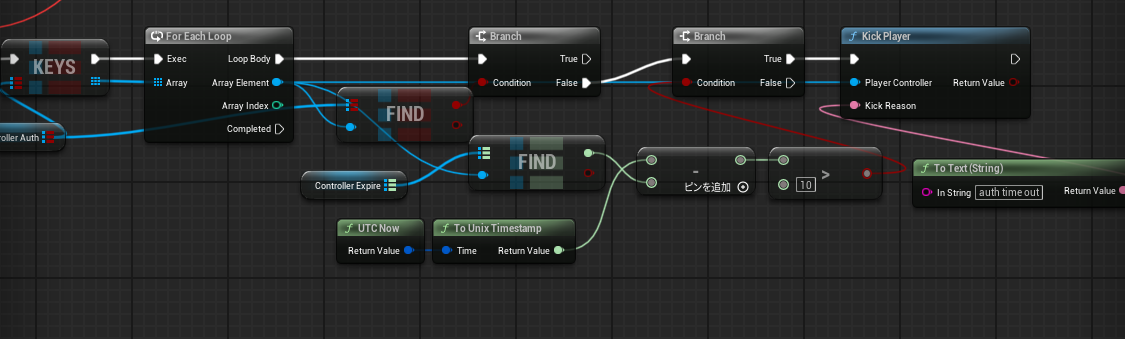
If client doesn’t respond to JWT exchange for any reason, kick after timeout.
UE Execution Container Image
https://github.com/mizuamedesu/ue-server-env
#!/bin/bash
set -e
echo "Starting UE server setup..."

if [ ! -d "/game/Engine" ] || [ ! -d "/game/${PROJECT_DIR}" ]; then
  echo "ERROR: Required game files are not mounted. Please mount the game directory to /game."
  exit 1
fi

if [ ! -f "/game/${PROJECT_DIR}/${SERVER_SCRIPT}" ]; then
  echo "ERROR: Server start script (${SERVER_SCRIPT}) not found in /game/${PROJECT_DIR}/"
  exit 1
fi

# Grant execute permission to script
if [ -w "/game/${PROJECT_DIR}/${SERVER_SCRIPT}" ]; then
  chmod +x "/game/${PROJECT_DIR}/${SERVER_SCRIPT}" || true
fi

if [ ! -d "$SAVED_PATH" ]; then
  echo "Creating saves directory at $SAVED_PATH"
  mkdir -p "$SAVED_PATH"
fi

# Modify game config using environment variables (if needed)
CONFIG_FILE="/game/${PROJECT_DIR}/Config/DefaultGame.ini"
if [ -f "$CONFIG_FILE" ]; then
  if grep -q "ServerName=" "$CONFIG_FILE"; then
    sed -i "s/ServerName=.*/ServerName=${SERVER_NAME}/" "$CONFIG_FILE"
  fi

  if grep -q "MaxPlayers=" "$CONFIG_FILE"; then
    sed -i "s/MaxPlayers=.*/MaxPlayers=${MAX_PLAYERS}/" "$CONFIG_FILE"
  fi

  echo "Updated server configuration with environment variables"
fi

echo "Starting UE dedicated server..."
echo "Server Name: $SERVER_NAME"
echo "Max Players: $MAX_PLAYERS"
echo "Game Port: $SERVER_PORT"
echo "Query Port: $QUERY_PORT"

# Build launch options
LAUNCH_OPTIONS="-log -port=${SERVER_PORT} -queryport=${QUERY_PORT} -NetServerMaxTickRate=${NET_SERVER_MAX_TICK_RATE:-100}"

# If RCON is enabled
if [ "$RCON_ENABLED" = "true" ]; then
  LAUNCH_OPTIONS="$LAUNCH_OPTIONS -rconport=${RCON_PORT}"
  echo "RCON Port: $RCON_PORT"
fi

# Add additional launch options if present
if [ ! -z "$ADDITIONAL_ARGS" ]; then
  LAUNCH_OPTIONS="$LAUNCH_OPTIONS $ADDITIONAL_ARGS"
fi

# Start server
cd "/game/${PROJECT_DIR}"
echo "Executing: ./${SERVER_SCRIPT} ${LAUNCH_OPTIONS}"
exec "./${SERVER_SCRIPT}" $LAUNCH_OPTIONS
Wrapper shell script matching UE export format. Docker container that starts when binary directory is mounted.
Agones Fleet
apiVersion: "agones.dev/v1"
kind: Fleet
metadata:
  name: ue5-gameserver-fleet
  namespace: game
spec:
  replicas: 5
  template:
    metadata:
      labels:
        app: ue5-server
    spec:
      ports:
      - name: game
        containerPort: 7777
        protocol: UDP
        portPolicy: Dynamic
      - name: query
        containerPort: 27015
        protocol: UDP
        portPolicy: Dynamic

      health:
        disabled: false
        initialDelaySeconds: 30
        periodSeconds: 15

      eviction:
        safe: Always
      template:
        metadata:
          labels:
            app: ue5-server

        spec:
          runtimeClassName: kata
          nodeSelector:
            hardware: game-runner

          topologySpreadConstraints:
          - maxSkew: 1
            topologyKey: kubernetes.io/hostname
            whenUnsatisfiable: ScheduleAnyway
            labelSelector:
              matchLabels:
                app: ue5-server

          securityContext:
            runAsNonRoot: true
            runAsUser: 1000
            fsGroup: 1000
            seccompProfile:
              type: RuntimeDefault

          containers:
          - name: gameserver
            image: ghcr.io/mizuamedesu/ue-server-env:latest
            imagePullPolicy: Always

            env:
            - name: PROJECT_DIR
              value: ""
            - name: SERVER_SCRIPT
              value: "DOMINATIONServer.sh"
            - name: SERVER_NAME
              valueFrom:
                fieldRef:
                  fieldPath: metadata.name
            - name: MAX_PLAYERS
              value: "16"
            - name: SERVER_PORT
              value: "7777"
            - name: QUERY_PORT
              value: "27015"

            securityContext:
              allowPrivilegeEscalation: false
              capabilities:
                drop: ["ALL"]
              readOnlyRootFilesystem: false

            resources:
              requests:
                memory: "16Gi"
                cpu: "2000m"
              limits:
                memory: "16Gi"
                cpu: "20000m"

            volumeMounts:
            - name: game-files
              mountPath: /game
              subPath: LinuxServer
              readOnly: false # Not ideal, temporarily false but should fix later
          volumes:
          - name: game-files
            persistentVolumeClaim:
              claimName: ue5-game-files-s3-pvc
Sharp readers might notice the UE container starts on Port:7777, so wouldn’t each instance use one IP address? The answer is no - Agones automatically handles NAT, so without any special consideration, IP+Port(7000~8000) is returned and you can connect directly.
Also, I’m using kata as runtimeClass here, but normally runc is fine.
Various yamls at: https://github.com/mizuamedesu/ue-k8s
Interesting point: using Cloudflare R2 for PersistentVolume.
Agones SDK Integration
https://agones.dev/site/docs/guides/client-sdks/unreal/ https://github.com/googleforgames/agones/tree/release-1.54.0/sdks/unreal
Agones does heartbeat, so minimum plugin enablement needed or it infinitely restarts thinking it’s dead.
Lifecycle
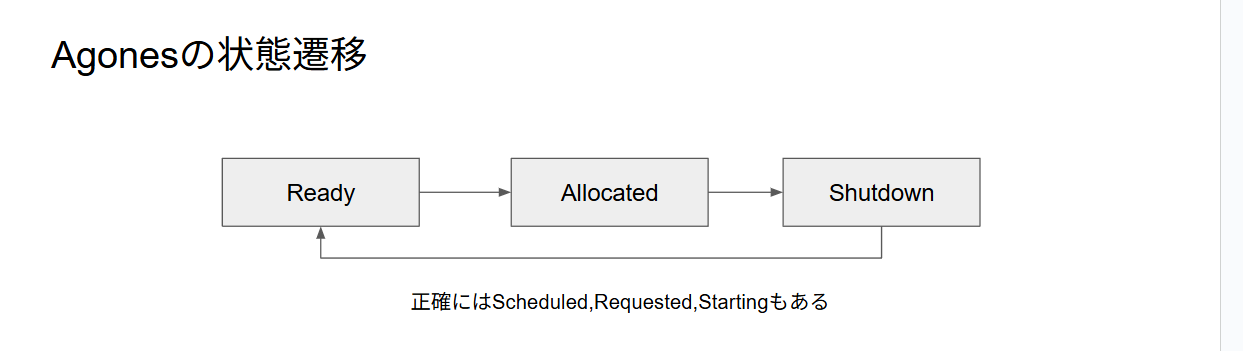
Agones manages game instance lifecycle, with main state transitions: Ready, Allocated, Shutdown.
- Ready Waiting for client connections.
- Allocated One or more clients are assigned.
- Shutdown Instance is terminating.
Shutdown requires UE server-side API call.
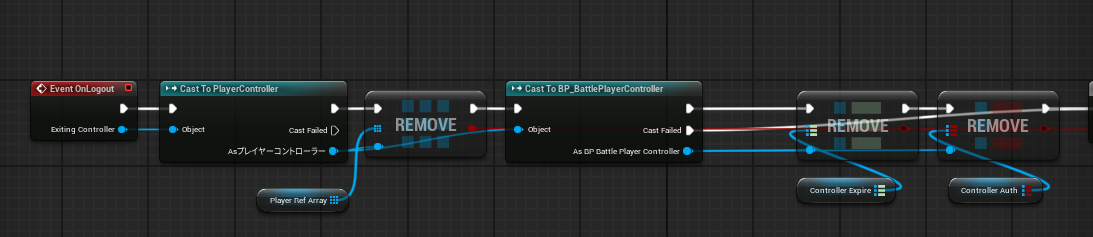
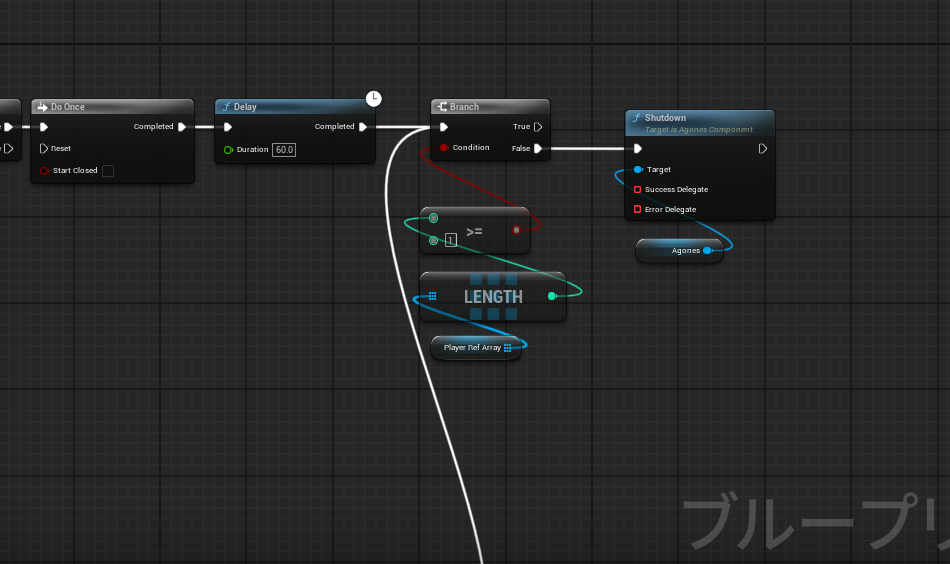
Override GameMode’s Event OnLogout, call SDK shutdown function when player controller count reaches 0. Then Agones automatically recycles the Pod, new instance starts and becomes Ready.
Finally
Gave a talk focusing more on K8s at CloudNative Days Winter 2025 student scholarship slot. (My part starts around 9 minutes remaining in video) https://event.cloudnativedays.jp/cndw2025/talks/2777
Also covered in University of Tsukuba Special Information Exercise. https://kdb.tsukuba.ac.jp/syllabi/2025/GB13312/jpn
https://mizuame.works/slides/Unreal.k8s%20%E4%B8%AD%E9%96%93%E5%A0%B1%E5%91%8A_20251015/
I understand networking, Unreal Engine, security, and cloud to some extent. For work inquiries, see https://mizuame.works/