Solving Kata Containers SandboxChanged Error
TL;DR
For those wanting quick solutions:
- Container started in k8s/k3s auto-restarts (dies and recreates) after 1-2 minutes
- Shows
SandboxChanged: Pod sandbox changed, it will be killed and re-created
Conclusion
Conflict between systemd and container runtime cgroup management causes sudden pod death.
Need to specify cgroup v1 on host:
GRUB_CMDLINE_LINUX="systemd.unified_cgroup_hierarchy=0"

sudo update-grub
sudo reboot
Environment
Environment: k3s cluster, Ubuntu 24.04, Kata Containers 3.2.0 Master: i3 7100 4GB * 3 Worker: xeon 2699v4 32GB * 1
Normal runc ran correctly for 10+ minutes. Kata Containers pods disappeared and recreated after 1-2 minutes without error logs.
Memory shortage?
$ kubectl exec -it ue5-gameserver-966c8c687-9z96b -n game -- /bin/sh
$ free -h
               total        used        free      shared  buff/cache   available
Mem:           9.9Gi       287Mi       9.5Gi       5.0Mi       157Mi       9.5Gi
Swap:             0B          0B          0B
$ cat /proc/meminfo | grep MemTotal
MemTotal:       10416748 kB
$ ps aux | grep "qemu-system-x86_64" | grep "\-m"
root 563936 53.0 2.3 ... -m 8196M,slots=10,maxmem=33006M ...Allocated ridiculous memory, no effect.
Testing with Lightweight Container
apiVersion: v1
kind: Pod
metadata:
  name: kata-test-nginx
spec:
  runtimeClassName: kata
  containers:
  - name: nginx
    image: nginx:alpine
    resources:
      limits:
        memory: "256Mi"
---
apiVersion: v1
kind: Pod
metadata:
  name: kata-test-stress
spec:
  runtimeClassName: kata
  containers:
  - name: stress
    image: polinux/stress
    command: ["stress"]
    args: ["--cpu", "1", "--vm", "1", "--vm-bytes", "128M", "--timeout", "3600s"]
NAME READY STATUS RESTARTS AGE
kata-test-nginx 1/1 Running 0 5m7s
kata-test-stress 1/1 Running 2 5m7s # ← 2 restarts
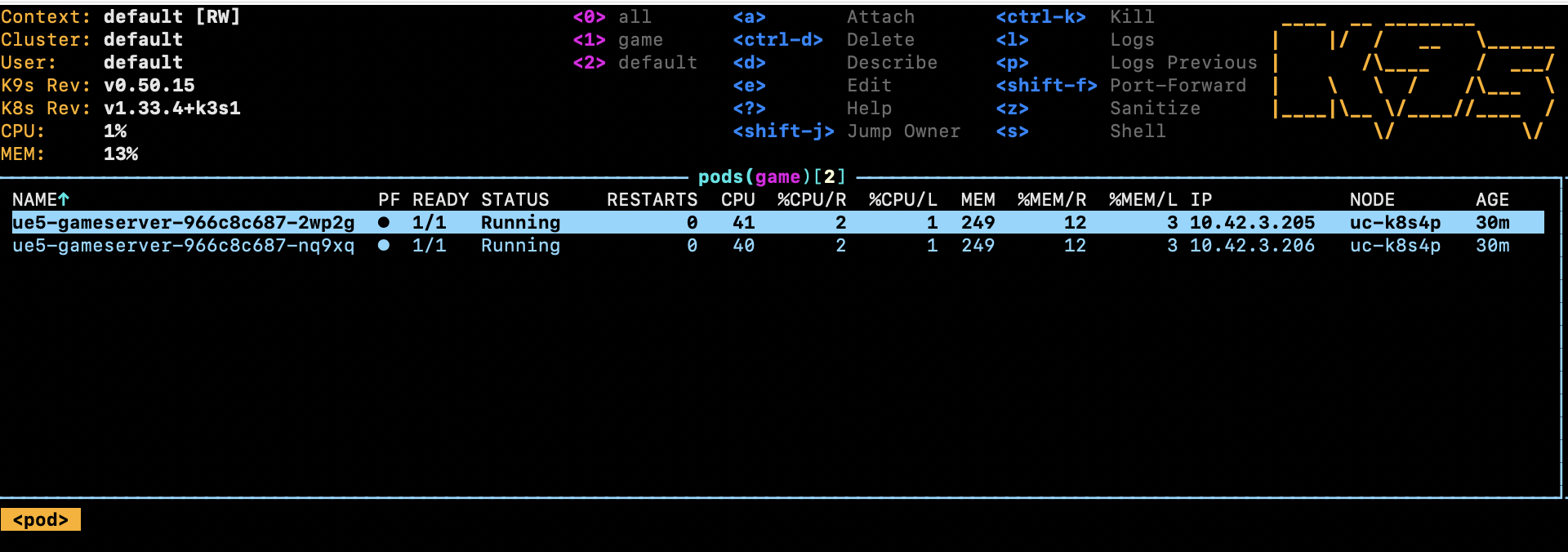
ue5-gameserver-966c8c687-7m85p 1/1 Running 5 13m # ← 5 restarts
ue5-gameserver-966c8c687-twhxr 1/1 Running 3 13m # ← 3 restartsLightweight one didn’t crash, high-load ones did. Originally running Unreal Engine dedicated server, but needed to identify if it’s UE’s problem or k3s-side. Result was k3s-side issue.
Logs
$ kubectl describe pod ue5-gameserver-966c8c687-qz4sn -n game | grep -A 10 "Events:"
Events:
  Type    Reason          Age                 From               Message
  ----    ------          ----                ----               -------
  Normal  Scheduled       2m3s                default-scheduler  Successfully assigned game/ue5-gameserver-966c8c687-qz4sn to uc-k8s4p
  Normal  Killing         49s                 kubelet            Stopping container gameserver
  Normal  SandboxChanged  48s                 kubelet            Pod sandbox changed, it will be killed and re-created.
  Normal  Pulled          47s (x2 over 2m1s)  kubelet            Container image "ue-server-env:latest" already present on machine
  Normal  Created         47s (x2 over 2m1s)  kubelet            Created container: gameserver
  Normal  Started         46s (x2 over 2m1s)  kubelet            Started container gameserver
Dying from SandboxChanged.
Kernel logs showed no errors.
Kata Logs
$ sudo journalctl -u k3s-agent --since "10 minutes ago" | grep "9f04f8b941e445c5" | tail -50
Oct 12 04:19:50 uc-k8s4p kata[556809]: time="2025-10-12T04:19:50.989892702Z" level=warning msg="Could not add /dev/mshv to the devices cgroup" name=containerd-shim-v2 pid=556809 sandbox=9f04f8b941e445c5...
Oct 12 04:21:06 uc-k8s4p k3s[556210]: I1012 04:21:06.672345  556210 pod_container_deletor.go:80] "Container not found in pod's containers" containerID="9f04f8b941e445c5..."
Container suddenly disappearing.
Internet to the Rescue
While frustrated, found a saint with same issue and solution. Thank you so much.
Took long to find this article, so writing my own. Hope it helps someone.
Checking cgroup Version
$ stat -fc %T /sys/fs/cgroup/
cgroup2fs
Confirmed cgroup2fs.
GRUB_CMDLINE_LINUX="systemd.unified_cgroup_hierarchy=0"

sudo update-grub
sudo reboot
$ stat -fc %T /sys/fs/cgroup/
tmpfsReverted to v1.
Victory