Moving Characters with TypeScript in UE5
Introduction
Hi, I’m Mizuame, also an Unreal Engine engineer at Santa Sunrise Inc.. (This article is Powered By Santa Sunrise Inc.) Today we’ll move characters not with Blueprints or C++, but with TypeScript.
LLMs are advancing, and Unity C# gets heavy AI assistance. But UE’s Blueprints are GUI-based, making it unreasonable to code with even multimodal LLMs. However, my experience having LLMs write low-level languages like Rust and C++ is still rough.
So, a scripting language that’s code-based is needed for UE (right?)
That’s where TypeScript comes in.
Using PureTS
https://github.com/Tencent/puerts
A plugin by Tencent that lets you write Unity/Unreal in TypeScript.
Frequently updated, supporting UE4.22 through latest 5.5.
What’s Happening?
Some of this I don’t fully understand. Sorry if wrong.
C++ doesn’t have reflection, but Unreal Engine uses:
UCLASS() USTRUCT() UENUM()meta info to generate reflection.
UObject::ProcessEventAnd call arbitrary functions.
https://qiita.com/unknown_ds/items/30ea13c9d50f2c2de6ff
PureTS generates TypeScript type definitions and provides binding layer with V8/QuickJS/Node.js.
Performance concerns for reflection-based binding, but:
https://github.com/Tencent/puerts/tree/master/unreal
It’s sufficiently practical according to their benchmarks.
Using It
Get the appropriate version from releases.
For UE5.2, Unreal_v1.0.5 worked. https://github.com/Tencent/puerts/releases/tag/Unreal_v1.0.5
Place like normal Plugin. C++ project conversion required.
Create Type Definition Files
Puerts.GenRun the command or:
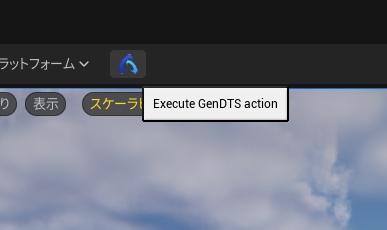
Press the editor button,
Plugins\Puerts\Typing\ueand
"ue.d.ts""puerts.d.ts"These two type definition files should be exported.
File Placement
MyProject/
├── Config/
├── Content/
├── Source/
├── TypeScript/
└── MyProject.uproject
Create TypeScript folder at project root, place the two files. Verify types are recognized in your code editor.
Mode Change
In
Plugins\Puertsrun:
node enable_puerts_module.jsVerify
tsconfig.jsonwas generated at root.
Configuration Change
Add to tsconfig.json:
"skipLibCheck": true,Write Code
Write in the Typing folder. Transpile with tsc; js goes to
Content\JavaScriptwith the same name. At this point:
- Starts with
import * as UE from 'ue'; - File name matches class name
- Ends with
export default ClassName;
Without these three, it won’t be recognized in the editor.
import * as UE from 'ue';
class TS_Character extends UE.Character {
    SpringArm: UE.SpringArmComponent;
    Camera: UE.CameraComponent;

    WalkSpeed: number = 600.0;
    MouseSensitivity: number = 1.0;

    Constructor() {
        // Character movement settings
        this.bUseControllerRotationPitch = false;
        this.bUseControllerRotationYaw = false;
        this.bUseControllerRotationRoll = false;

        this.CharacterMovement.bOrientRotationToMovement = true;
        this.CharacterMovement.RotationRate = new UE.Rotator(0.0, 540.0, 0.0);
        this.CharacterMovement.MaxWalkSpeed = this.WalkSpeed;

        this.SpringArm = this.CreateDefaultSubobject(
            "SpringArm",
            UE.SpringArmComponent.StaticClass(),
            UE.SpringArmComponent.StaticClass(),
            true,
            false
        ) as UE.SpringArmComponent;
        this.SpringArm.SetupAttachment(this.RootComponent, "");
        this.SpringArm.TargetArmLength = 300.0;
        this.SpringArm.bUsePawnControlRotation = true;

        // Camera setup
        this.Camera = this.CreateDefaultSubobject(
            "Camera",
            UE.CameraComponent.StaticClass(),
            UE.CameraComponent.StaticClass(),
            true,
            false
        ) as UE.CameraComponent;
        this.Camera.SetupAttachment(this.SpringArm, "");
        this.Camera.bUsePawnControlRotation = false;
    }


    // Called when game starts
    ReceiveBeginPlay(): void {
        super.ReceiveBeginPlay();

    }

    MoveForward(Value: number): void {
        if (Value != 0.0 && this.Controller) {
            const Rotation = this.Controller.GetControlRotation();
            const YawRotation = new UE.Rotator(0, Rotation.Yaw, 0);

            const Direction = UE.KismetMathLibrary.GetForwardVector(YawRotation);

            this.AddMovementInput(Direction, Value);
        }
    }

    MoveRight(Value: number): void {
        if (Value != 0.0 && this.Controller) {
            const Rotation = this.Controller.GetControlRotation();
            const YawRotation = new UE.Rotator(0, Rotation.Yaw, 0);

            const Direction = UE.KismetMathLibrary.GetRightVector(YawRotation);

            this.AddMovementInput(Direction, Value);
        }
    }


}

export default TS_Character;
Write using syntax highlighting and LSP.
LLMs help somewhat but often lie, so fixes are needed.
Execution
After tsc transpile, check if recognized in editor.
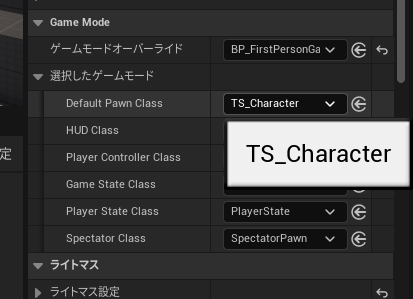
If successful, it should be recognized.
Result
https://x.com/mizuameisgod/status/1907809617851343291
Summary
How was it?
While writing Unreal C++ with LLMs is tough, TypeScript works reasonably well, so feeding in domain knowledge (context window, fine-tuning) could be practical.
But currently, users still need TypeScript, Unreal, and some C++ knowledge.