Rapid App Development with Swift + LLM
React Native is a Lie
Hi, I’m Mizuame. I’m currently providing a free Speech-to-Text Whisper model at https://whisper.mizuame.app, but it has no visibility, so I decided to make a native app.
The finished app is here, please try it:
https://apps.apple.com/app/swift文字起こし/id6743728982
Technology Selection
As mentioned, I initially developed with React Native for both Android and iOS, but it was too rough. Development basically depends on using lots of libraries, but the library-project version combinations often break things, and Google results are often environment-specific, causing much frustration.
Also, accessing smartphone features requires native API wrapper libraries, which are also rough. They don’t work.
My conclusion: don’t use it except for SNS-like apps that can be directly ported from web (especially when touching phone features).
Rapid Development with Claude
So I started developing in Swift, transpiling React code using Claude. I had never written Swift before.
Currently cline and cursor are trending, but from my experience with LLMs, they’re quite usable as transpilers from natural language, but design and reasoning are still lacking.
Digression: Natural Language Coding
Seeing “professional surprised people” on Twitter claiming job loss, but I think they haven’t reached the level of fully standalone app development yet.
Will express more opinions in another article.
Development
React components were transpiled to Swift format with some redesign.
When errors occurred, I googled to abstract the problem, fed it to the LLM to fix using Swift domain knowledge, read docs myself, and checked.
This created the foundation. Took about 5 hours.
Adding Admob
Wanted banner ads, so added Admob. I summarized settings and latest specs, designed them, and had Claude write functions.
Problems
When launching on emulator, kernel died and crashed immediately.
First suspected Admob error. Using official Swift SDK, so thought it was implementation. Had Claude rewrite to output debug logs. But connection was normal.
Next suspected permissions. Error code matched permission-related errors when googled. Read Apple docs, wrote permission KV to info, and it stopped dying. Yay!
Submission
Became an Apple Developer (12,980 yen/year) and submitted. Some UI was confusing, but I managed thanks to my AWS Console experience with abstracted GUIs.
Attached iPhone 16 Pro Max emulator screenshots, built with Xcode, submitted.
Rejection
This is a detailed App Store review result for your "swift文字起こし" app. Several issues were pointed out:

Guideline 2.3.7 - Performance - Accurate Metadata

App subtitle contains price references, inappropriate as metadata.
Solution: Remove price mentions from metadata, include in app description if needed.


Guideline 2.3.8 - Performance - Accurate Metadata

Marketplace app name (swift文字起こし) and device display name (WhisperClient) don't match.
Solution: Change one or both names to be similar to avoid user confusion.


Guideline 3.1.1 - Business - Payments - In-App Purchase

Paid digital content or services included in app are available through non-in-app purchase methods. Specifically, donations to developers are purchasable through external payment methods.
Solution: All paid digital content, services, subscriptions must use in-app purchase only.


Guideline 5.1.1 - Legal - Privacy - Data Collection and Storage

Microphone usage purpose string doesn't adequately explain protected resource usage.
Solution: Update microphone purpose string to clearly explain how the app uses the microphone with specific examples.
Let’s fix them.
Guideline 2.3.7 - Performance - Accurate Metadata
Apparently putting “free” in the subtitle was not allowed.
Guideline 2.3.8 - Performance - Accurate Metadata
Initial project name differed from app name. Could fix in build settings without changing project name.
Guideline 3.1.1 - Business - Payments - In-App Purchase
Apparently linking to Buy Me a Coffee in-app was not allowed.
Guideline 5.1.1 - Legal - Privacy - Data Collection and Storage
Just saying “Permission required to use microphone” wasn’t enough apparently.
They even attached an image.
Adding In-App Purchase
Since directing to other payment services in-app is not allowed, obediently added in-app subscription.
Purchasing removes ads.
Implemented quickly with StoreKit 2.
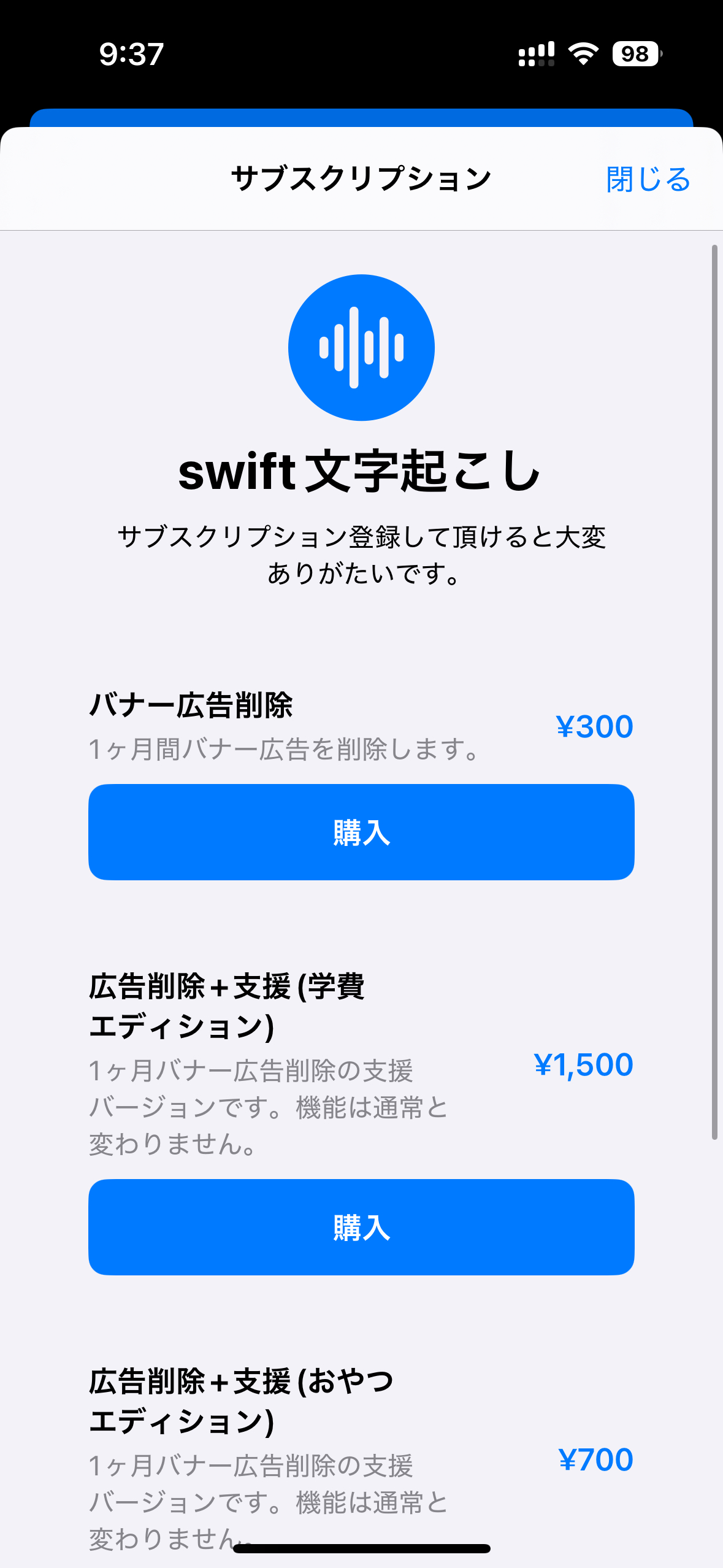
Implemented.
Rejection
Guideline 3.1.2 - Business - Payments - Subscriptions
Issue Description


The submission did not include all the required information for apps offering auto-renewable subscriptions.


The app's metadata is missing the following required information:


- A functional link to the Terms of Use (EULA). If you are using the standard Apple Terms of Use (EULA), include a link to the Terms of Use in the App Description. If you are using a custom EULA, add it in App Store Connect.


Next Steps


Update the metadata to include the information specified above.


Resources


Apps offering auto-renewable subscriptions must include all of the following required information in the binary:


- Title of auto-renewing subscription (this may be the same as the in-app purchase product name)

- Length of subscription

- Price of subscription, and price per unit if appropriate

- Functional links to the privacy policy and Terms of Use (EULA)


The app metadata must also include functional links to the privacy policy in the Privacy Policy field in App Store Connect and the Terms of Use (EULA) in the App Description or EULA field in App Store Connect.


Review Schedule 2 of the Apple Developer Program License Agreement to learn more.
I had set it to automatically remove ads if subscribed on launch, but apparently an explicit restore button was needed.
Release
After various rejections and fixes, finally released. About 6 days from start to release.
Battle History
