
Self-Hosting HedgeDoc On-Premises
This article is Day 1 of coins Advent Calendar 2024.
What is HedgeDoc?
Official Site A self-hosted HackMD-like service that lets you write in Markdown, with login authentication, sharing, and collaborative editing.

Running Without a Global IP
Typically, self-hosting requires renting a VPS for a global IP, but we’ll use Cloudflare Tunnel to punch through. Your domain management needs to be under Cloudflare.
Installation
First, prepare a server. Install Docker as a prerequisite. I set up an Ubuntu 24.04 server on Proxmox. For Docker, 2 cores and 2GB+ RAM should work.
Cloudflare Tunnel Setup
This is just copying the setup code shown when creating a Tunnel in the Cloudflare dashboard, so I won’t explain in detail.
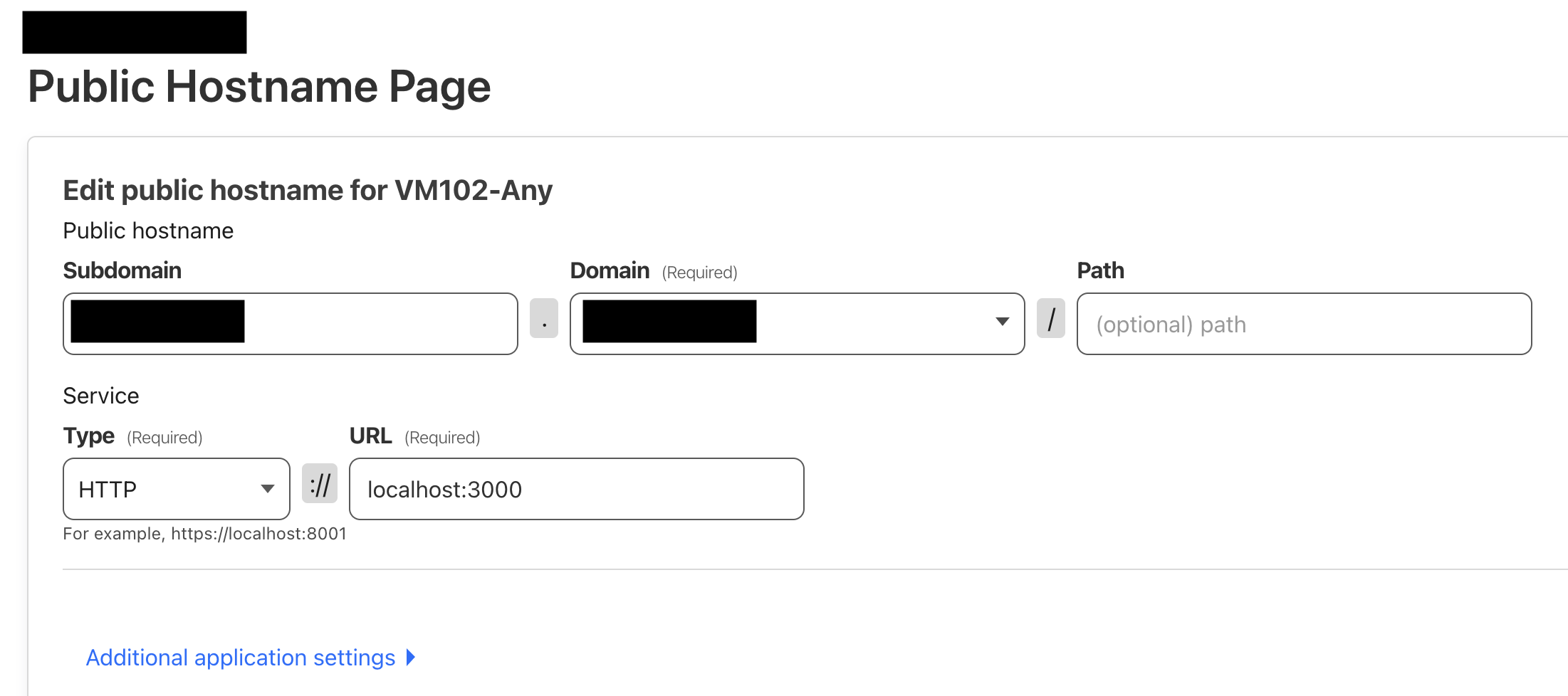
Docker Setup
sudo usermod -aG docker $USERFirst add your current user to the group (if not done).
Create docker-compose.yml:
nano docker-compose.ymlWrite the following:
version: '3'
services:
  database:
    image: postgres:13.4-alpine
    environment:
      - POSTGRES_USER=hedgedoc
      - POSTGRES_PASSWORD=password
      - POSTGRES_DB=hedgedoc
    volumes:
      - database:/var/lib/postgresql/data
    restart: always
  app:
    image: quay.io/hedgedoc/hedgedoc:1.9.9
    environment:
      - CMD_DB_URL=postgres://hedgedoc:password@database:5432/hedgedoc
      - CMD_DOMAIN={your-cloudflare-domain}
      - CMD_PROTOCOL_USESSL=true
      - CMD_URL_ADDPORT=false
      - CMD_TRUST_PROXY=true
      - CMD_CSP_ENABLE=true
      - CMD_CSP_REPORT_ONLY=false
      - "CMD_CSP=default-src 'self' https://{your-cloudflare-domain} https://*.cloudflareusercontent.com; connect-src 'self' https://{your-cloudflare-domain} wss://{your-cloudflare-domain} https://*.cloudflareusercontent.com; font-src 'self' data: https://{your-cloudflare-domain} https://*.cloudflareusercontent.com https://cdnjs.cloudflare.com https://fonts.gstatic.com; img-src 'self' data: blob: https://{your-cloudflare-domain} https://*.cloudflareusercontent.com; script-src 'self' 'unsafe-inline' 'unsafe-eval' https://{your-cloudflare-domain} https://*.cloudflareusercontent.com https://cdnjs.cloudflare.com; style-src 'self' 'unsafe-inline' https://{your-cloudflare-domain} https://*.cloudflareusercontent.com https://cdnjs.cloudflare.com https://fonts.googleapis.com; base-uri 'self'; manifest-src 'self'; frame-src *"
    volumes:
      - uploads:/hedgedoc/public/uploads
    ports:
      - "3000:3000"
    restart: always
    depends_on:
      - database
volumes:
  database:
  uploads:
Replace with your configured domain.
{your-cloudflare-domain}Then:
docker compose up -dto start. Success looks like:

Access
Access the domain,

and register an account. You can use a fake email address.
[email protected]Note: the part before @ becomes the username.
Disabling New Registrations
Edit the yml:
version: '3'
services:
  database:
    image: postgres:13.4-alpine
    environment:
      - POSTGRES_USER=hedgedoc
      - POSTGRES_PASSWORD=password
      - POSTGRES_DB=hedgedoc
    volumes:
      - database:/var/lib/postgresql/data
    restart: always
  app:
    image: quay.io/hedgedoc/hedgedoc:1.9.9
    environment:
      - CMD_DB_URL=postgres://hedgedoc:password@database:5432/hedgedoc
      - CMD_DOMAIN=md.{your-cloudflare-domain}
      - CMD_PROTOCOL_USESSL=true
      - CMD_URL_ADDPORT=false
      - CMD_TRUST_PROXY=true
      # Email settings
      - CMD_EMAIL=true
      - CMD_ALLOW_EMAIL_REGISTER=false
      # Disable anonymous access
      - CMD_ALLOW_ANONYMOUS=false
      - CMD_ALLOW_ANONYMOUS_EDITS=false
      # CSP settings
      - CMD_CSP_ENABLE=true
      - CMD_CSP_REPORT_ONLY=false
      - "CMD_CSP=default-src 'self' https://*.{your-cloudflare-domain} https://*.cloudflareusercontent.com; connect-src 'self' https://*.{your-cloudflare-domain} wss://*.{your-cloudflare-domain} https://*.cloudflareusercontent.com; font-src 'self' data: https://*.{your-cloudflare-domain} https://*.cloudflareusercontent.com https://cdnjs.cloudflare.com https://fonts.gstatic.com; img-src 'self' data: blob: https://*.{your-cloudflare-domain} https://*.cloudflareusercontent.com; script-src 'self' 'unsafe-inline' 'unsafe-eval' https://*.{your-cloudflare-domain} https://*.cloudflareusercontent.com https://cdnjs.cloudflare.com; style-src 'self' 'unsafe-inline' https://*.{your-cloudflare-domain} https://*.cloudflareusercontent.com https://cdnjs.cloudflare.com https://fonts.googleapis.com; base-uri 'self'; manifest-src 'self'; frame-src *"
    volumes:
      - uploads:/hedgedoc/public/uploads
    ports:
      - "3000:3000"
    restart: always
    depends_on:
      - database
volumes:
  database:
  uploads:
Configuration is done with:
      - CMD_ALLOW_EMAIL_REGISTER=false
      - CMD_ALLOW_ANONYMOUS=false
      - CMD_ALLOW_ANONYMOUS_EDITS=false
See the configuration list for details. Restart Docker and confirm only sign-in is available.
Want to Use GitHub Login, but…
Following the official documentation works, but you can’t restrict by organization, effectively allowing anyone to register. Therefore, you need to either use authentik for authentication, or restrict access via Cloudflare Access with a proxy.
Conclusion
This was the first day’s article, but it ended up being a geeky tech post. Tomorrow is Ya-’s article, looking forward to it!